
Table of contents
- Why Your Applied Epic Workflow Breaks Down
- The Applied Epic Workflow at a Glance
- Step 1 of the Applied Epic Workflow: Download, Suspense and Activities
- Step 2: Service Work in Your Applied Epic Workflow
- Step 3: Renewals in the Applied Epic Workflow
- Step 4: Claims and Accounting in the Applied Epic Workflow
- What Stays With Licensed Staff in an Applied Epic Workflow
- Setting Up Applied Epic Access for a VA
- How XAssure VAs Fit Into Your Applied Epic Workflow
- Summing Up
- Frequently Asked Questions
- Also Reads
Applied Epic can run almost every part of an independent agency: accounts, policies, renewals, certificates, carrier downloads and accounting. But the system only performs as well as the Applied Epic workflow wrapped around it. When activities sit open past their follow-up dates, downloads pile up in suspense and renewals reach the 30-day mark untouched, the problem is rarely the software. It is hours.
This guide walks through a typical Applied Epic workflow, from the first carrier download of the day to month-end commission reconciliation. At each step you’ll see where a trained virtual assistant (VA) plugs in, what should stay with licensed staff, and how to give a VA access without weakening your security.
Why Your Applied Epic Workflow Breaks Down
Applied describes Applied Epic as a browser-native platform that handles property and casualty and benefits business in one system, with workflow automation, insurer connectivity and granular security controls built in. Most agencies that run it are not short of features. They are short of people to work the queues those features create.
The warning signs look the same in almost every agency:
- The Activities List on the Home screen shows hundreds of open activities, many past their follow-up date
- Carrier download items sit in Suspense because nobody has matched them to an account
- Renewals Manager shows policies inside the 90-day window with no stage update
- Certificate and endorsement requests arrive by email and never become activities
- Direct bill commission statements wait weeks to be reconciled
Each of those is a process step, not a judgment call. That is what makes them ideal VA work, and why the rest of this guide is organised around the Applied Epic workflow itself rather than around job titles.
The Applied Epic Workflow at a Glance
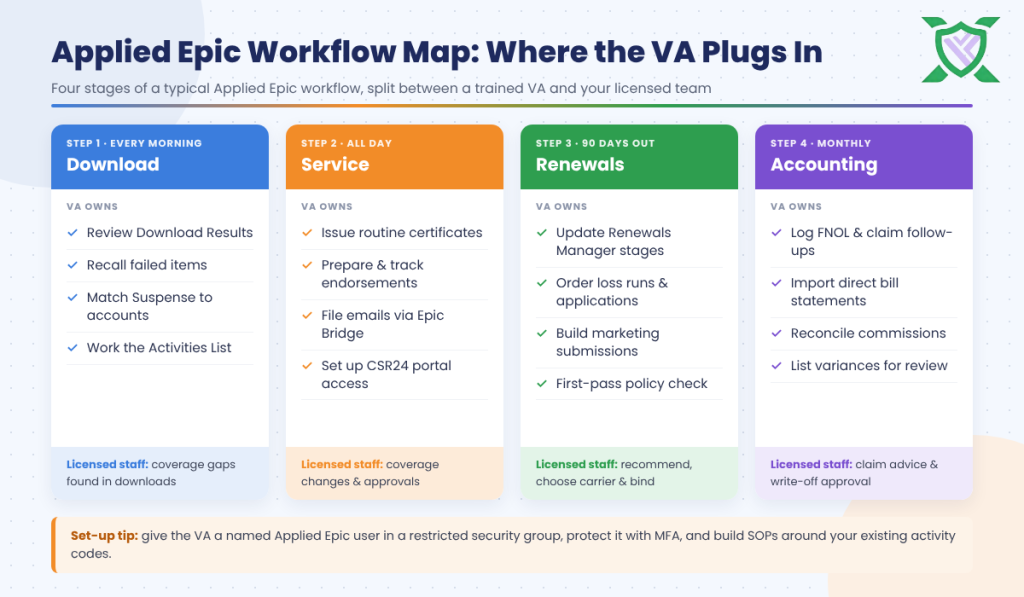
Here is how a typical day and month break down, and who should own each stage.
| Stage | What happens in Applied Epic | Who owns it |
| Carrier download | Review Download Results, recall failed items, match Suspense items to accounts | VA |
| Service requests | Open an activity, process the certificate, endorsement or ID card, attach documents, close the activity | VA, with licensed review where coverage changes |
| Renewals | Work the Renewals Manager pipeline, build marketing submissions, chase applications | VA prepares; licensed staff recommend and bind |
| Claims support | Log first notice of loss, attach documents, follow up on status | VA; licensed staff advise the client |
| Accounting | Import and reconcile direct bill commission statements | VA; accounting approves write-offs |
Step 1 of the Applied Epic Workflow: Download, Suspense and Activities
Clearing the Carrier Download
Carriers send policy data, documents, messages, claims and commission information to Applied Epic through the IVANS download. Most of it attaches to the right account automatically. Whatever can’t be matched lands in Suspense, and an agency that ignores Suspense quickly ends up with policy records that don’t match what the carrier actually issued.
A VA can start every morning on the Download Results screen (Procedures > Interface Management > Download Results), filter for errors, use the Recall option to have failed items re-sent, and then match each Suspense item to the correct account and policy. It is precise, repetitive work, and it keeps every later step of your Applied Epic workflow built on accurate data.
Working the Activities List
Activities are the engine of Applied Epic. Each one has an activity code, an owner (an employee or a work group), a follow-up date and a priority, and it is closed as Successful or Unsuccessful when the work is done. According to Applied’s help documentation on activities, activities can’t be deleted once added, which is exactly why they make such a strong E&O record.
The Home screen’s Activities List can be filtered to all open, urgent open or unscheduled activities. A VA works their own queue and a shared work group queue each day, closes what is finished, updates follow-up dates on what is waiting, and flags anything that needs a licensed decision. When activities are worked daily, your account managers stop scrolling past stale items and start the day with only the work that needs them.
Many service requests still arrive by email. Epic Bridge, Applied’s Outlook add-in, lets staff find the account, add attachments and notes, and handle the request without leaving Outlook. A VA who files every client email to the right account and opens an activity for every request makes sure nothing lives only in someone’s inbox.
Step 2: Service Work in Your Applied Epic Workflow
Certificates and Evidence of Property
The Proofs of Insurance area in Applied Epic covers certificates, evidences of property and premium proof processing, using ACORD forms such as the Certificate of Liability. A VA can issue routine certificates from existing coverage, check holder names and additional insured wording against the endorsements actually on the policy, and log each certificate against an activity.
Anything that asks for coverage the policy doesn’t have goes back to licensed staff. If you want the background on which form does what, see our guide to ACORD forms 25, 125 and 126.
Endorsements and Policy Changes
In Applied Epic, a change to an existing line runs through the Endorse a Policy process: you enter the effective date and a description, submit the change request, wait for the carrier’s return by download or paper, and then issue (or not issue) the endorsement. Because the process spans days, it is easy to lose track of.
A VA can prepare the change, submit it in the carrier portal according to your SOP, set a follow-up date on the activity, and chase the carrier until the endorsement comes back. Licensed staff approve anything that changes coverage, limits or deductibles. The VA makes sure the Applied Epic workflow behind the change actually finishes.
ID Cards and the Applied CSR24 Client Portal
Applied CSR24 gives clients online and mobile self-service for certificates, ID cards, policy information and payments. A VA can create portal accounts from inside Applied Epic and show clients how to use them, which steadily cuts the number of “can you send me my ID card” requests your team handles by hand.
Step 3: Renewals in the Applied Epic Workflow
The 90-Day Renewal Pipeline
Renewals Manager gives you a single view of policies coming up for renewal and the status of each one. By default, policies appear 90 days before expiration, and the window can be adjusted by policy type, as explained in Applied’s Renewals Manager help page.
A VA can run a weekly review of the pipeline, update each renewal stage, order loss runs, request updated exposures and applications from clients, and set activities for every open item. By the time a producer looks at a renewal, the paperwork is already in the file. The same 90-day structure works in other systems too; our AMS 360 renewal workflow guide walks through it step by step.
Remarketing With Master Marketing Submissions
When a renewal needs to be shopped, Applied Epic uses a Master Marketing Submission as the template for individual carrier submissions. From there you create carrier submissions, submit them, record each carrier response and, once a decision is made, move the marketed lines to current policies.
A VA can build the master submission, prepare and send the carrier submissions, log every response and assemble a side-by-side summary. If your agency uses Indio for commercial applications, the VA can also connect the Indio submission to the renewal activity and chase the client until the application is complete. The producer chooses the carrier and makes the recommendation.
First-Pass Policy Checking
Applied’s integrated policy checking compares a policy with the expiring term, a carrier quotation or your proposal, if your agency uses it. For most personal lines, Applied notes the Service Summary Comparison report may give better results. Either way, a VA can run the first-pass check on every renewal and new policy, list the discrepancies, and hand them to the account manager. That turns policy checking from a task that gets skipped into one that happens on every file.
Step 4: Claims and Accounting in the Applied Epic Workflow
Claims Logging and Follow-Up
From the account’s Claims area, a VA can log first notice of loss details, attach photos and documents, record the carrier claim number and set follow-up activities for status checks. After a storm, that alone can take dozens of calls off your licensed team. Advice on whether to file, or how coverage applies, stays with licensed staff.
Direct Bill Commission Reconciliation
Under General Ledger > Reconciliations, Applied Epic lets you import direct bill commission statements from Excel or the carrier download, then record or reconcile them carrier by carrier. Variances can be written off, but only with approval.
A VA can import every statement, reconcile it line by line, research missing or short-paid commissions and prepare a variance list for your accounting lead. We cover the wider process in Commission Reconciliation Is Killing Your Fridays: Here Is the Fix.
What Stays With Licensed Staff in an Applied Epic Workflow
A VA makes your Applied Epic workflow faster. It does not replace licensed judgment. Use this split when you write SOPs.
| A VA can own | Licensed staff keep |
| Download Results, recalls and Suspense matching | Decisions on coverage gaps found in downloads |
| Routine certificates from existing coverage | Certificates that need coverage the policy lacks |
| Preparing and tracking endorsements | Approving changes to coverage, limits or deductibles |
| Renewals Manager stages, loss runs and applications | Renewal recommendations and binding |
| Building marketing submissions and logging responses | Choosing carriers and advising the client |
| First-pass policy checking | Resolving discrepancies with the carrier and client |
| Direct bill commission imports and reconciliation | Approving write-offs and adjustments |
Licensing rules vary by state, so confirm the split with your E&O carrier and label every SOP “licensed” or “unlicensed”.
Setting Up Applied Epic Access for a VA
A Named User in the Right Security Group
Give your VA their own named Applied Epic user. Applied Epic manages rights through Group Security Configuration, where administrators add groups, assign members, set rights and apply visibility profiles. The common best practice is to assign rights to groups, never to individual users, and to audit those groups at least once a year.
Create a VA security group with only the rights the role needs: no rights to change accounting setup, no access to confidential clients unless required, and no ability to alter configuration. That is least privilege applied to your Applied Epic workflow.
Multi-Factor Authentication and Single Sign-On
Applied Epic can use Microsoft 365 as its identity provider, so users sign in with their own Microsoft 365 account and pass a multi-factor authentication (MFA) challenge. Each Epic user then needs a distinct Microsoft 365 email. Whatever method you use, never let a VA work under a producer’s login. Shared credentials destroy your audit trail and create E&O and data security problems.
Activity Codes and myEpic Workflows as Your SOPs
Activity codes can be configured with a default owner, follow-up days and automatic tasks. Applied Epic also includes myEpic workflows: preconfigured step-by-step processes for common actions that improve consistency and support time tracking. Building your VA SOPs around the activity codes and myEpic workflows you already use means the VA follows the same steps as everyone else, and every action is recorded in the same place.
Our guide on how to onboard an insurance virtual assistant covers the first week in more detail.
How XAssure VAs Fit Into Your Applied Epic Workflow
XAssure provides insurance-trained virtual assistants who already know agency workflows and the systems they run on:
- Trained in your AMS: Applied Epic, AMS 360, EzLynx, HawkSoft, NowCerts and QQ Catalyst, plus carrier portals
- Work assigned the way you already work: through Applied Epic activities or email
- Live dashboard: real-time task timers and daily, weekly and monthly work reports
- Secure credentials: carrier portal logins managed through LastPass or 1Password, never shared in email
- Support team: a dedicated account manager and a program success manager who help build and refine your SOPs
- Simple pricing: $1,050 a month for 20 hours a week or $2,000 a month for 40 hours a week, with a 2-week free trial
Best for: agencies on Applied Epic that have the system configured but not enough hours to keep activities, downloads and renewals current.
Summing Up
Applied Epic gives your agency the structure: activities, Renewals Manager, Proofs of Insurance, marketing submissions and reconciliation tools. A well-run Applied Epic workflow needs someone to work those queues every day. A trained VA can own the download, the Activities List, routine service, renewal preparation and commission reconciliation, while licensed staff keep coverage decisions, recommendations and binding.
Set the VA up as a named user in a limited security group, protect access with MFA, and write SOPs around the activity codes you already use. When you are ready to try it on your own book, XAssure can match you with an insurance-trained VA and let you test the work free for two weeks.
Frequently Asked Questions
Yes. A VA can be set up as a named Applied Epic user in a security group with limited rights. They can then work the Activities List, download and Suspense, certificates, endorsements, renewals and commission reconciliation just like in-house staff, with every action recorded against their own user.
Start with high-volume, rules-based tasks: clearing Suspense, issuing routine certificates, updating Renewals Manager stages and importing direct bill commission statements. Once those run smoothly, add endorsements, marketing submissions and first-pass policy checking.
It can be, if access is set up properly. Use a named user, a restricted security group, multi-factor authentication and a password manager, and choose a provider with documented security controls. Never share a producer’s login.
No. Binding, recommending coverage and advising clients are licensed activities. A VA prepares renewals, builds marketing submissions and logs carrier responses, while your licensed staff make the recommendation and bind.
An insurance-trained VA who already knows Applied Epic only needs to learn your agency’s activity codes, SOPs and carriers. XAssure’s onboarding typically takes 7 to 10 days, starting with low-risk tasks before moving to renewals and endorsements.
Yes. XAssure VAs work in AMS 360, EzLynx, HawkSoft, NowCerts and QQ Catalyst as well as Applied Epic, along with major carrier portals.
Also Reads
- AMS 360 Renewal Workflow Guide: How Top Agencies Handle Renewals Without Drowning
- EzLynx Setup Guide: How High-Volume Personal Lines Agencies Use VAs in EzLynx
- ACORD Forms Explained: 25, 125, 126 & Who Should Be Filling Them
- Commission Reconciliation Is Killing Your Fridays: Here Is the Fix
- Why Your Agency E&O Risk Goes Up When Your CSR Is Overwhelmed